Load the correct enemy faction
Confirm the enemy faction name and ID before using the board. Refresh after the war changes or when status information looks old.
The target board organizes enemy members by current state and priority. Use it to narrow the field, verify the target in Torn, and send a callout without rebuilding the same information by hand.
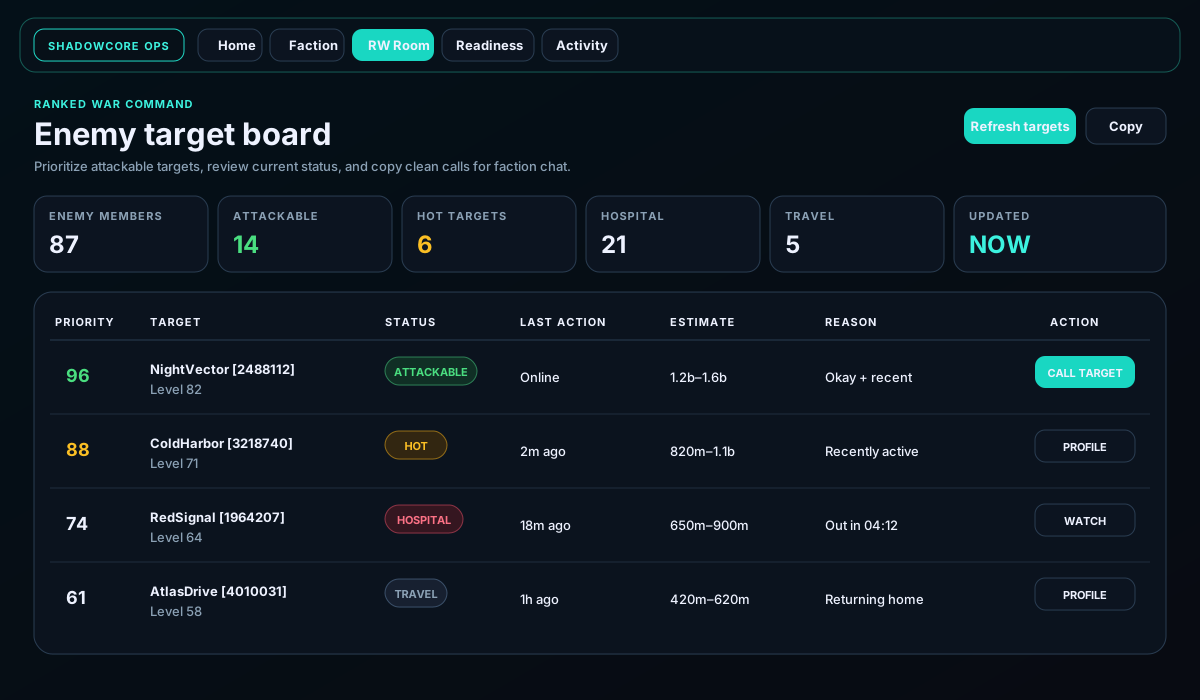
Confirm the enemy faction name and ID before using the board. Refresh after the war changes or when status information looks old.
Use the status filters to reduce noise. Attackable means the board sees an immediate opportunity; hot generally means current activity makes the target important to watch.
Priority combines available context. It does not replace battle-stat judgment, faction strategy, or a final profile check.
Check the target's current status, hospital timer, travel state, and attack button immediately before acting. The live Torn page is the final authority.
Use the copy action so members receive the target name, ID, status, and relevant context in a consistent format.
Load the current opponent or open the war selector. Do not reuse a board from an older matchup.
Refresh the board and verify the target in Torn. Status can change faster than any saved board.
The board may still show status and profile actions. Treat missing estimate data as unknown rather than zero.
Confirm the row has a valid Torn ID and that your current role is permitted to use target actions.