Choose the metric that matches the question
Use recent 15-minute activity for immediate responsiveness, online average for visible presence, recent 60-minute activity for broader participation, or Okay/available coverage for operational readiness.
The Activity Tracker turns repeated faction snapshots into patterns. Use the heatmap for the big picture, inspect individual cells for member detail, and compare Torn time with local time before scheduling a chain, war push, announcement, or officer coverage.
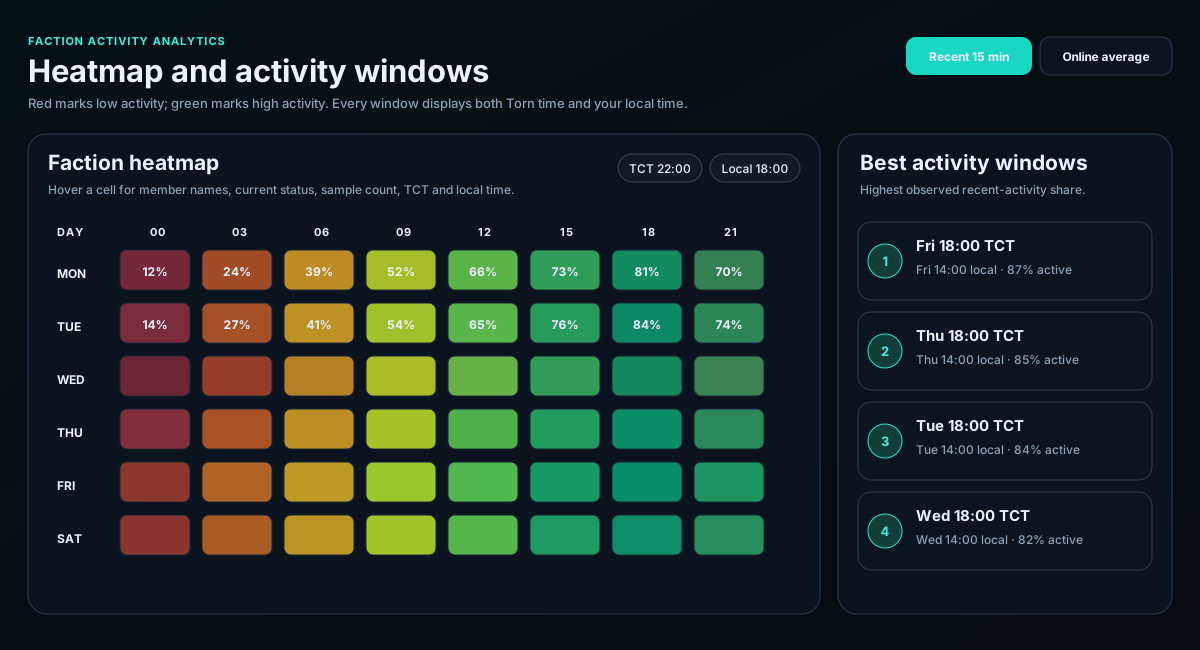
Use recent 15-minute activity for immediate responsiveness, online average for visible presence, recent 60-minute activity for broader participation, or Okay/available coverage for operational readiness.
Look for repeated green regions across several days rather than one isolated cell. A strong pattern is more useful than a single lucky hour.
Review which members contributed to that window and what status was observed. The cell percentage alone does not explain who was active.
Use TCT for faction-wide coordination and local time for your own planning. Watch for local day shifts such as -1d or +1d.
Best windows are candidates for chains, pushes, announcements, and events. Quiet windows identify coverage gaps, weaker response periods, and times that may need extra officer presence.
No usable snapshots were recorded for that weekday/hour and metric. Empty is unknown, not zero activity.
Your local timezone may place the same TCT hour on the previous or next calendar day.
The list follows the selected metric. A member may qualify for recent activity without qualifying for another state.
It is the number of historical faction snapshots used to calculate that window. More evidence generally makes the pattern more dependable.