Refresh the board
Refresh before a chain, war push, defense call, or emergency message. Check the source line to confirm the roster and Personal snapshot counts are sensible.
The Readiness Board combines the current faction roster with the newest valid Personal snapshot for each member. It should produce one row per roster member and explain why someone is ready, limited, blocked, stale, or missing data.
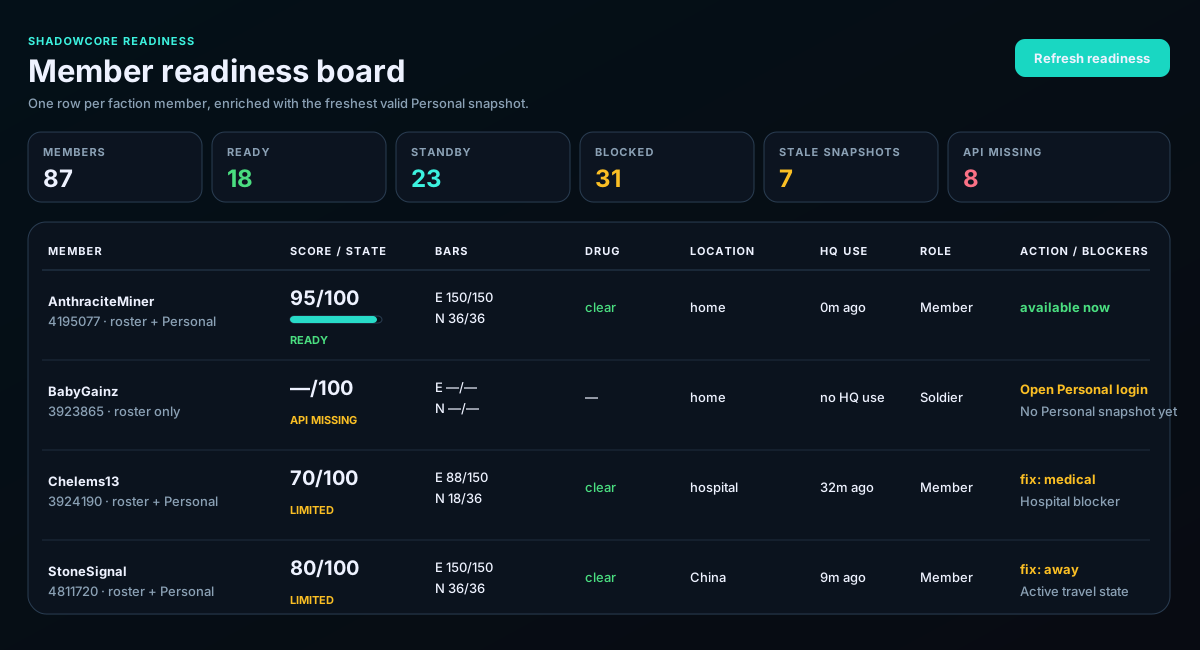
Refresh before a chain, war push, defense call, or emergency message. Check the source line to confirm the roster and Personal snapshot counts are sensible.
Ready and Standby are useful groups, but the score is not the entire decision. Confirm bars, location, cooldown, snapshot age, and listed blockers.
—/— means ShadowCore does not have usable bar data for that member. It must not be interpreted as 0/0. Ask the member to open Personal and refresh their snapshot.
Old Personal data can make bars, cooldowns, or travel state misleading. A stale label means the member should refresh before leadership relies on the row.
The action should tell you whether to call the member, refresh Personal data, wait for a cooldown, return home, or resolve another blocker.
Rows should be keyed by Torn ID from the authoritative faction roster. Browser labels or unmatched snapshot names should never become extra faction members.
The newest operational snapshot should control travel and status. Older destinations must not be merged into newer bars.
The member can still appear from the roster. Ask them to open Personal and refresh so bars and cooldowns can enrich the row.
Read the component signals and blocker list first. A full bar does not cancel travel, medical, cooldown, stale-data, or assignment issues.