Members refresh Personal
Before a major operation, ask members to open Personal and allow the automatic snapshot capture to complete. This updates energy, nerve, life, cooldowns, status, travel, and battle-stat coverage.
Readiness works best as a repeatable process: current Personal data, one authoritative faction roster, clear blockers, and a concise call list.
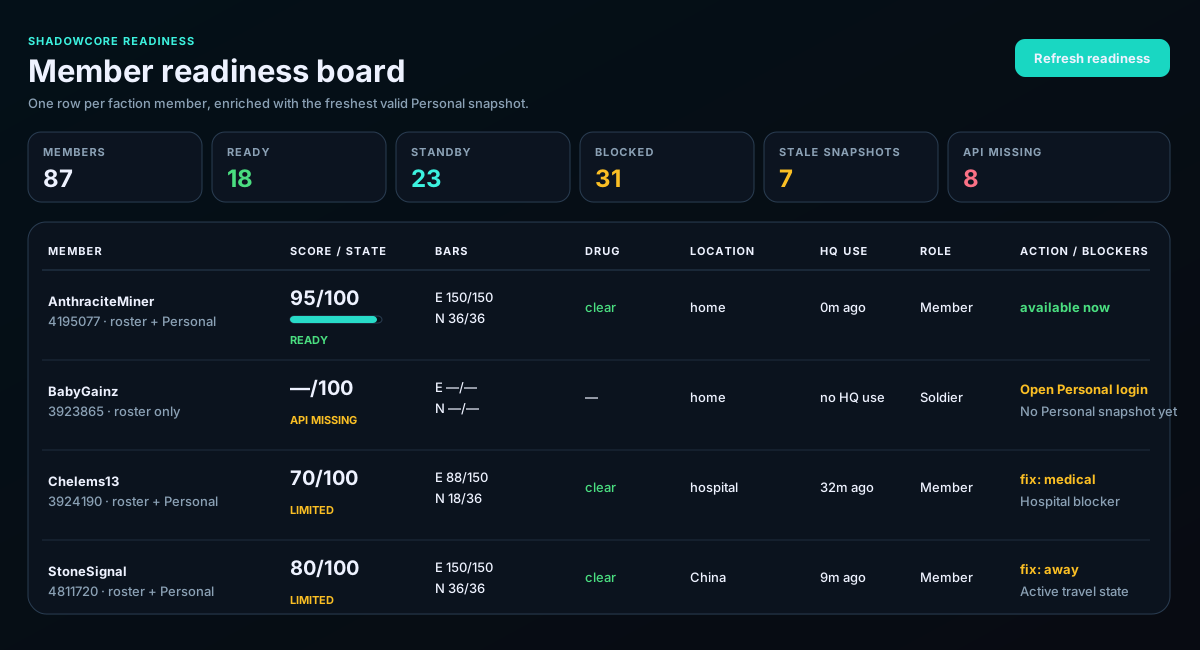
Before a major operation, ask members to open Personal and allow the automatic snapshot capture to complete. This updates energy, nerve, life, cooldowns, status, travel, and battle-stat coverage.
Confirm the source line shows the expected faction roster count. The board should show one row per roster member and attach the newest valid snapshot to that identity.
Start with Ready, then Standby. Review Limited members individually. API Missing means the member is known from the roster but lacks usable Personal data.
Travel, hospital, life, drug cooldown, stale data, no recent HQ use, and missing operational data can reduce availability even when a member appears active.
If location, bars, or status contradict what the member reports, check snapshot age and refresh. Do not manually reinterpret unknown data as zero.
Use the Discord summary for a fast call, then keep the board open during the operation so changes can be refreshed.
Refresh shortly before target calls so travel, hospital, energy, and cooldown information is useful.
Use the board with Activity windows to estimate both current usability and likely participation.
Refresh after returning home, leaving hospital, clearing cooldown, refilling energy, or updating Personal data.
Check timestamp and source first. Incorrect-looking rows are often stale or missing snapshots rather than scoring arithmetic.