Let history accumulate
Automatic faction snapshots need time to build a dependable picture. A few days can reveal early patterns; several weeks is more useful for recurring schedules.
Activity history does not predict intent, but it reveals patterns. Use enough samples, choose the metric that matches the decision, inspect the members behind the percentage, and combine the result with Readiness before scheduling an operation.
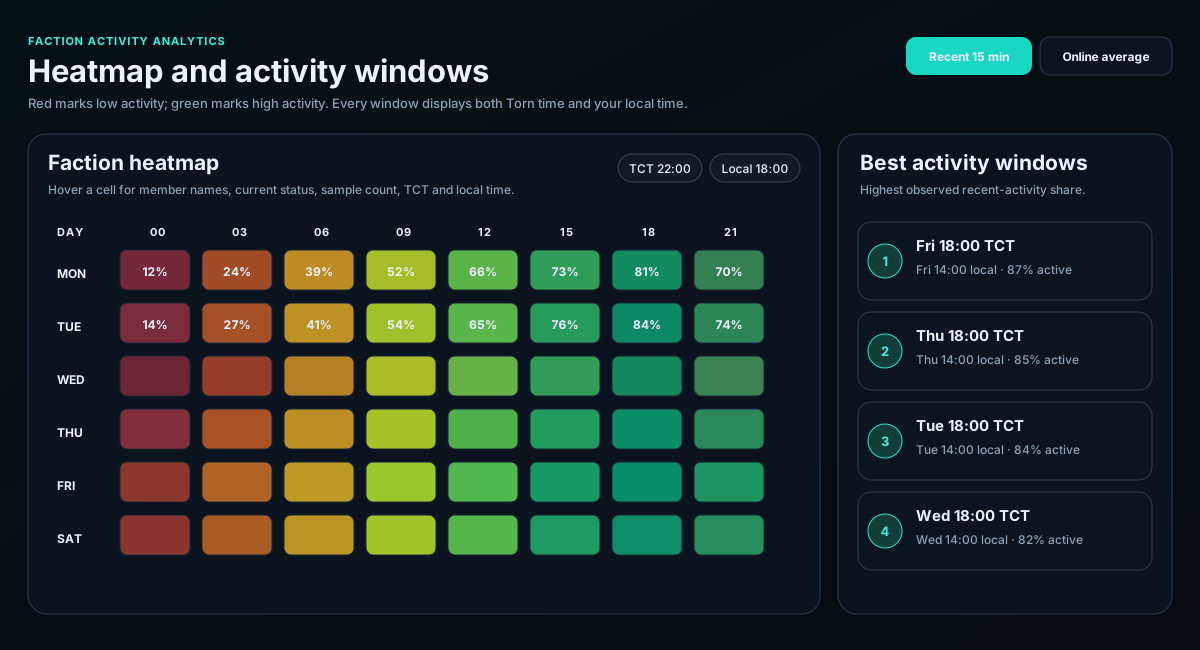
Automatic faction snapshots need time to build a dependable picture. A few days can reveal early patterns; several weeks is more useful for recurring schedules.
Recent 15-minute activity answers “who is responding now?” Online average measures visible presence. Recent 60-minute activity captures broader participation. Okay/available coverage is closer to operational availability.
Green means higher observed activity and red means lower observed activity. Compare the sample count before trusting the ranking.
Hover or select the cell. Review names, observed status, contribution count, TCT, and local time. The same percentage can come from very different member groups.
Use strong windows for chains, ranked-war pushes, major announcements, training events, or meetings that need broad participation.
Use low-coverage windows to plan officer coverage, avoid weak push times, identify recruitment needs, or schedule lower-priority work.
Coordinate faction-wide in TCT and use the displayed local time for personal scheduling. Watch for a previous-day or next-day local conversion.
Historical activity identifies when members are usually present. Refresh Readiness before the actual event to check energy, cooldowns, travel, hospital state, and fresh Personal data.
Choose a start that overlaps a repeated high-activity region, then confirm current Readiness and member availability.
Schedule planned pushes around stronger response windows, while keeping live target and readiness data current.
Identify weak coverage periods and prioritize prospects whose normal schedule may strengthen those gaps.
Use quiet periods to assign leadership coverage or avoid leaving the faction without a caller during known weak hours.