Finalize the payout calculation in Leader
Use the Leader payout report to set the pool, minimum, rounding, weights, and member payout scores. Save the calculation before treating Banking as final.
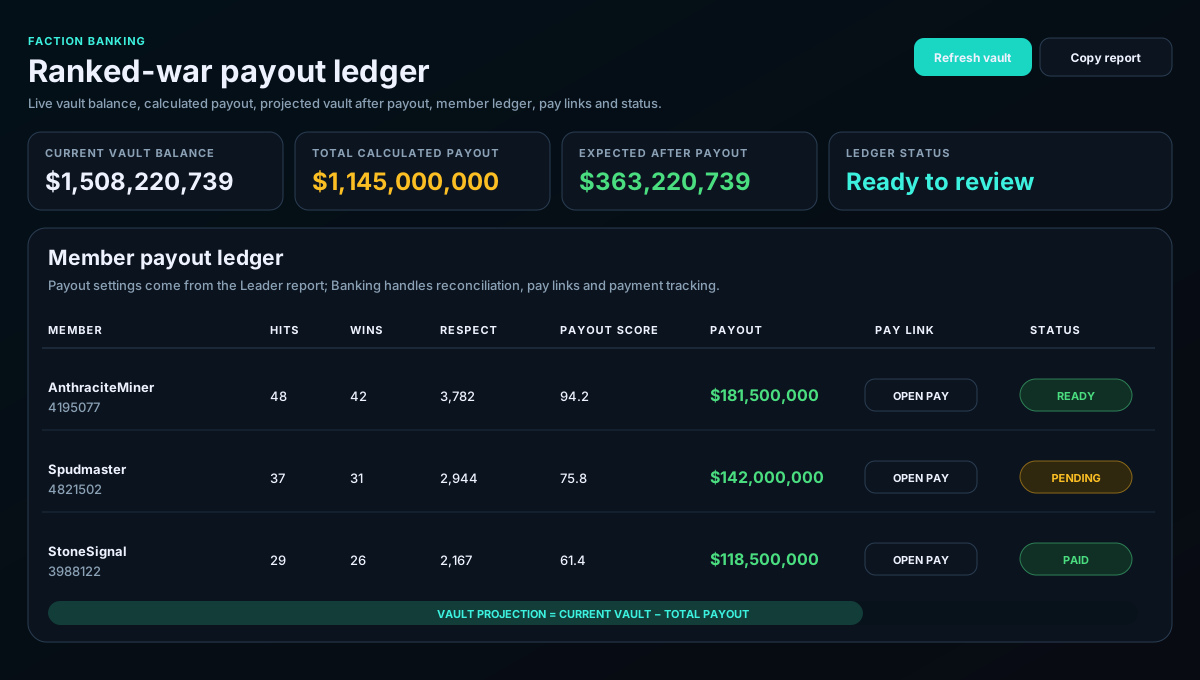
Faction Banking consumes the saved Leader payout calculation, compares it with the live faction vault, creates a per-member ledger, provides direct pay links, and tracks payment status and audit notes.
Use the Leader payout report to set the pool, minimum, rounding, weights, and member payout scores. Save the calculation before treating Banking as final.
Load the newest faction vault snapshot and saved payout ledger. Confirm the faction name and ID before making payments.
Compare current vault, total payout, and expected balance after payout. If the result is negative or unexpectedly low, stop and resolve the funding difference first.
Check the contribution figures, payout score, and final payout. Banking should reflect the Leader report rather than recalculating with separate settings.
Open the member's pay link, complete the Torn payment, update the status, add any necessary audit note, and save the ledger.
The current vault is smaller than the calculated payout. Add funds or revise the payout plan before sending payments.
Save or refresh the Leader ranked-war payout report, then reload Banking.
Refresh the banking snapshot and check the displayed sync time before relying on the number.
Members can view the saved ledger, while Officer and higher roles can edit notes and save the ledger.