Verify the faction badge
The page must show the intended faction name and ID. Faction ID is not optional because saved snapshots, transactions, and loans must remain isolated by faction.
Armory Intelligence is faction-scoped. The signed-in account supplies the required faction identity, and the encrypted Leader backend key pool handles synchronization automatically—no optional faction field and no Personal key prompt.
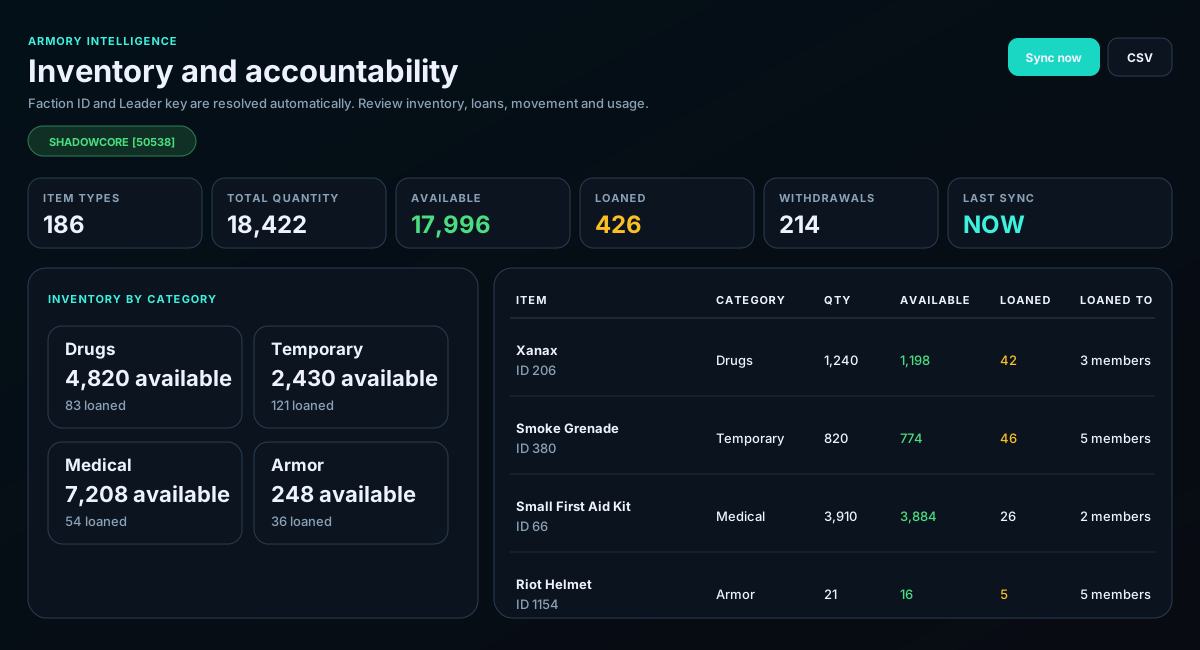
The page must show the intended faction name and ID. Faction ID is not optional because saved snapshots, transactions, and loans must remain isolated by faction.
On load, Armory checks the saved snapshot age. Missing or stale data is synchronized through the Leader backend key pool. Use Sync now only when an immediate forced refresh is needed.
Compare available and loaned quantities. A sudden change in the loaned total or a category total is a reason to inspect the item rows and transaction history.
Use item name and ID to verify the resource, then review quantity, available amount, loaned amount, and the member names attached to loans.
The transaction table explains what moved and when. The usage ladder summarizes repeated withdrawals so officers can find patterns without reading every receipt.
Select the report type, then copy a leadership summary or export CSV for a longer review.
Re-login after faction access is configured, or make sure an active Leader key for the correct faction exists in the backend pool.
A Leader must add or reactivate a faction key. Personal browser keys are not used for Armory synchronization.
The latest sync failed, but an older faction-scoped snapshot is available. Check the last-sync time before relying on it.
The source movement record did not include a usable member name. Use the Torn ID or transaction context to investigate.